Top 10: Best On-site Event Badge Printing Solutions (2026)

In this Article
- On-site badge printing is becoming the standard for professional events, replacing pre-printed badges for faster check-in, real-time updates, and reduced waste.
- The best on-site conference badge solutions combine registration, check-in, and printing in one system, minimizing setup, staffing, and data sync issues on event day.
- Choosing the right provider depends on event size, complexity, and hardware needs, with trade-offs between all-in-one convenience, flexibility, and cost.
The Best On-site Event Badge Printing Solutions (Top 10 for 2026)
On-site badge printing is no longer a nice-to-have, it’s quickly becoming a must-have for modern events. When attendees walk into your event, their first stop sets the tone. Will it be a chaotic scramble through stacks of pre-printed badges? Or a quick scan, instant print, and a confident smile? More and more planners are opting for the latter. Whether you're running a multi-day conference, a trade show, or a high-profile corporate summit, on-site badge printing (often referred to as “on-demand badge printing”) gives you flexibility, professionalism, and peace of mind. It keeps your lines short, your data current, and your check-ins polished and top-tier. In this guide, we’ll break down exactly what on-site badge printing is, why it’s a smarter move than pre-printing, how it works behind the scenes, and what features matter most when choosing a solution. Then we’ll walk you through 10 of the top providers, so you can find the one that best fits your event.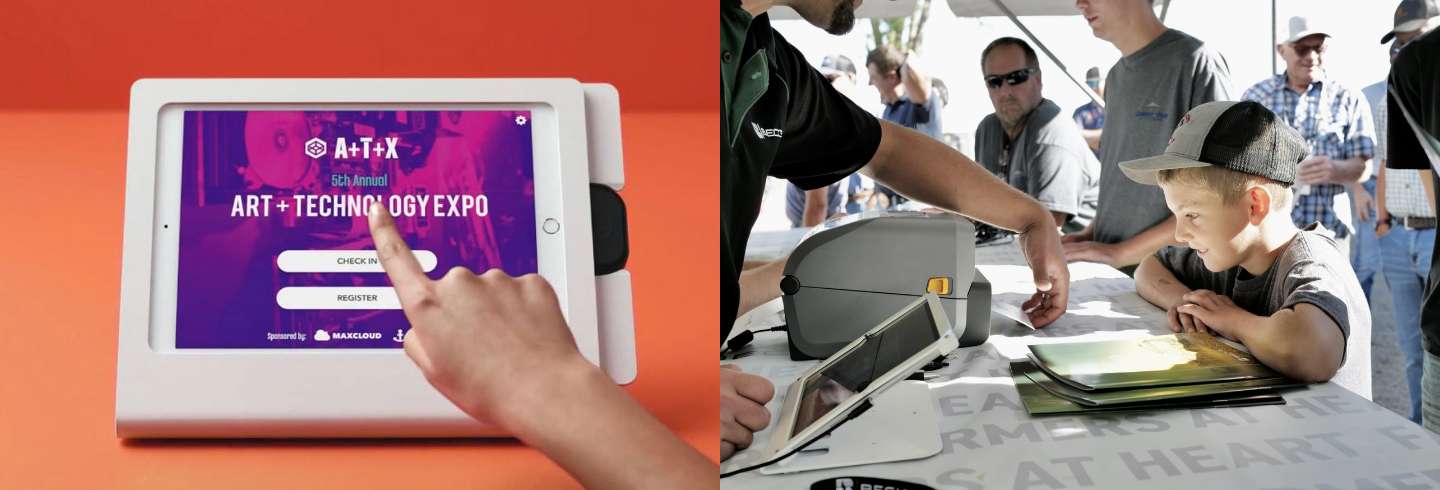
Left: On-site check-in and badge printing kiosk; Right: Badge printed on-demand at Becknology Days™ (source: Instagram)
What Is On-site Badge Printing?
On-site, or “On-demand” badge printing refers to the practice of printing attendee badges in real-time when they arrive and check-in at your event — instead of pre-printing badges ahead of time, sorting and alphabetizing them, then shuffling to find and hand them out at your event. Whether you're hosting a trade show, conference, or corporate gathering, this approach helps you deliver a smoother, faster, and more flexible check-in experience. With on-site badge printing, attendees simply type in their name at a kiosk or scan a QR code at the check-in counter, and their badge prints instantly. The best on-site badge printing providers also allow for attendees to verify and update their info before hitting “print,” ensuring that their badge is up-to-date with their latest info. It’s a professional welcome, not a paper chase.Why Choose On-demand Over Pre-printed Badges?
Let’s face it: first impressions matter. Your registration area is the front door to your event. If it’s slow, chaotic, or cluttered with outdated badges, your attendees feel it. Pre-printing badges may seem convenient, but it often leads to unnecessary stress, higher costs, bogged-down check-in lines requiring more staff, and a bunch of waste from no-shows or last-minute changes. On-demand badge printing solves those problems. It reduces waste, cuts pre-event prep and sorting time, and lets you accommodate walk-ins, late arrivals, or last-minute edits without scrambling. Instead of rows of alphabetized name badges, you get a sleek, modern check-in flow that makes your event feel polished and forward-thinking.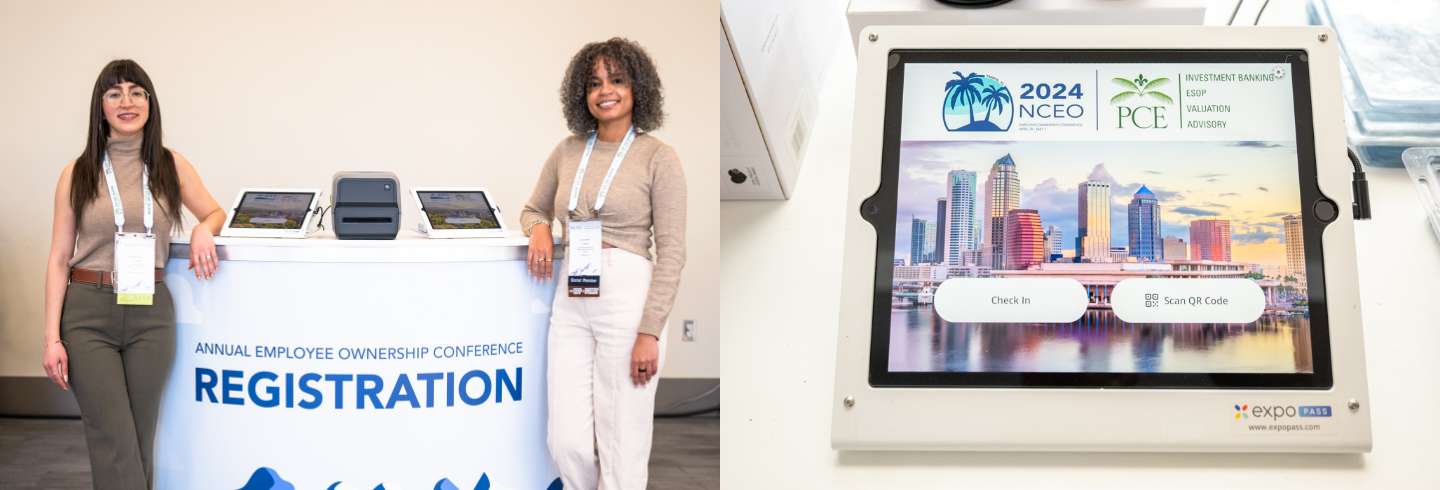
Modern on-site check-in and badge printing equipment at the NCEO Annual Conference (photo by David Rainey)
How Does On-site Badge Printing Work?
The process is simple. Attendees arrive at your check-in area and either scan a QR code sent to them in advance, or look up their name at a self-service kiosk. The system pulls their registration info and prints a badge on the spot. Some platforms also allow you to pre-print “badge shells” with your logo or sponsor branding, then print the attendee details (name, company, title, QR code) during check-in. This hybrid approach combines design flexibility with real-time personalization, and is generally considered the best option in 2025 for quality, efficiency, and professionalism. Setup can range from plug-and-play kits that ship directly to your venue to more DIY setups that work with your own hardware. Many platforms also integrate directly with your event registration software, keeping everything in sync and up to date.What Types of Events Is On-site Badge Printing Best Suited For?
On-site badge printing isn’t just for massive conferences (though it works beautifully there). It’s a versatile solution that scales up or down, depending on your needs. If your event involves checking in people, capturing data, or issuing credentials, chances are on-demand badges can streamline the process. Great fits for on-site badge printing include:- Conferences and Summits: Speed up entry for hundreds or thousands of attendees across multiple days or tracks.
- Trade Shows and Expos: Manage different badge types (exhibitor, sponsor, attendee) with ease and reduce long entry lines.
- Corporate Events: Deliver a polished, professional experience for clients, partners, or internal teams.
- Higher Education Events: Ideal for student orientations, alumni weekends, and academic conferences.
- Healthcare and Government Events: Control access, meet compliance, and personalize credentials securely.

Premium quality on-site paper badges at the 3686 Conference (credit: Elle Danielle, Flickr)
What to Look for in an On-site Badge Printing Solution
Not all on-site badge printing systems are created equal. Here are the key things to consider when choosing the right one for your event:- Hardware Quality & Support: Do they provide printers, kiosks, or tablets — or do you need to supply your own? Are setup instructions and support available?
- Complexity of Setup: Does equipment come pre-configured and work right out of the box, or require complex setup and software syncing?
- Speed & Ease of Check-in: Can attendees print their badge in seconds? Does the system reduce lines and wait times?
- Customization Options: Can you brand your badges? Add QR codes, color-coding, sponsor logos, or ribbons?
- Integration with Registration: Does it sync with your registration software, or will you need to upload attendee lists manually?
- Scalability & Flexibility: Will the system support both small and large events? Can it handle walk-ins, edits, or badge reprints on demand?
- Single-vendor Simplicity: Are you juggling multiple vendors for hardware, software, and printing, or is it all handled by one provider?

Finding the Best On-site Badge Printer for Your Event
Now that we’ve covered the how and why, let’s look at some of the top on-site badge printing solutions on the market today. But before diving into the list, remember that the best badge printing solution for your event depends on your size, budget, and tech stack. Some platforms offer full-service convenience, while others give you the flexibility to bring your own hardware or integrate with your favorite registration tool.The Top 10 On-site Badge Printing Solutions
1. Expo Pass
 Expo Pass offers organizers an easy on-site badge printing solution with everything fully integrated in-house, from pre-printed badge shells to software, check-in kiosks, and printers all configured, shipped, and plug-and-play. Designed for professional event teams, it delivers a fast, intuitive, branded, and polished on-site experience.
Pros:
Expo Pass offers organizers an easy on-site badge printing solution with everything fully integrated in-house, from pre-printed badge shells to software, check-in kiosks, and printers all configured, shipped, and plug-and-play. Designed for professional event teams, it delivers a fast, intuitive, branded, and polished on-site experience.
Pros:
- All-in-one badging solution: Expo Pass provides everything in-house including badge shells, printers, kiosks, and software — so planners don’t have to juggle third-party vendors or worry about incompatibility and sync issues.
- Fast check-in with thermal printing: Attendees scan a QR code or search their name at sleek iPad kiosks to instantly print a clean, smudge-free badge using direct thermal printers. The result is a premium badge, much higher in quality than most competitors or inkjet options.
- Custom, full-color badge shells: Badge shells are pre-printed with logos or sponsor branding, with attendee data added on-site for a polished, professional finish.
- Plug-and-play setup: Pre-configured hardware kits arrive labeled and ready to use, with simple setup guides and support from the in-house team.
- Real-time registration sync: All attendee data flows directly from the Expo Pass registration system, keeping badges current and eliminating the need for manual imports. Many third-party integrations and imports are supported if using other registration platforms.
- Drag-and-drop badge designer: Create custom badge designs with ease, including QR code integration, custom attendee data, and multiple types.
- Support for on-site registration and payments: Walk-in attendees can register on-site, make payments, and print a badge immediately.
- More robust than some events require: Smaller or casual events may not need the full suite of hardware and features Expo Pass provides.
- Hybrid color printing approach: Full-color branding and sponsor graphics are pre-printed on badge shells, with individualized attendee data printed in black and white on-site via direct thermal printing . Color direct thermal printing is not supported.
- Not designed specifically for bring-your-own-hardware: Expo Pass kits are optimized and pre-configured for their own hardware and software, great for using right out of the box, but require configuration if bringing additional third-party devices or your own printers/kiosks.
2. Cvent OnArrival
 Cvent OnArrival is built for enterprise-level events and offers badge printing when paired with Cvent’s broader platform. While powerful, its high costs and complexity can be a challenge for smaller teams.
Pros:
Cvent OnArrival is built for enterprise-level events and offers badge printing when paired with Cvent’s broader platform. While powerful, its high costs and complexity can be a challenge for smaller teams.
Pros:
- Kiosk check-in: Attendees can check in and print badges via iPad kiosks, streamlining entry at high-volume events.
- Live data sync with registration: Changes to attendee details are reflected instantly thanks to deep integration with Cvent’s registration tools.
- Support for on-site registration and payments: Walk-in attendees can register and pay on-site, and receive a badge immediately.
- Part of Cvent’s full ecosystem: The system integrates tightly with Cvent’s tools for a centralized event management experience.
- Hardware not included by default: Organizers must rent or source their own iPads, printers, and routers unless using Cvent’s full-service package
- Limited badge design flexibility: Customization options are basic, with some users noting the designer can feel clunky or outdated.
- High cost: Pricing can be prohibitive for many events that don’t use Cvent for their full tech stack.
3. EventMobi
 EventMobi provides badge printing through its Onsite app and badge designer. It's a good fit for mid-sized events using EventMobi registration, though advanced setups may require more planning.
Pros:
EventMobi provides badge printing through its Onsite app and badge designer. It's a good fit for mid-sized events using EventMobi registration, though advanced setups may require more planning.
Pros:
- Drag-and-drop badge designer: Users can create customized badge layouts with logos, colors, and attendee data.
- Kiosk-friendly check-in: The system supports iPad check-in kiosks for faster, self-directed entry.
- Real-time integration with registration: Attendee info syncs directly from EventMobi forms, avoiding manual imports.
- Manual setup required: Printer settings and templates may require additional setup and trial runs ahead of time to ensure accuracy.
- Limited hardware: EventMobi supports standard badge sizes and printers, but offers limited flexibility for custom badge types or third-party gear.
- Scaling for larger events: For bigger crowds, organizers may need multiple check-in stations to avoid delays.
4. Eventdex
 Eventdex offers badge printing and lead retrieval, making it a practical option for trade shows and expos. A flexible system, but it does require planners to provide their own hardware.
Pros:
Eventdex offers badge printing and lead retrieval, making it a practical option for trade shows and expos. A flexible system, but it does require planners to provide their own hardware.
Pros:
- Badge printing and lead capture: Badges are designed to work seamlessly with the lead scanning tools used by exhibitors.
- Printer compatibility: The system supports multiple printer types, including Zebra, Epson, and Brother, giving planners hardware flexibility, (but requiring additional research, setup, and testing).
- Mobile check-in app: Staff can check in attendees and print badges from a tablet or smartphone, ideal for flexible setups.
- Basic badge design tools: Customization is limited, with fewer layout and design options than other platforms.
- Primarily for Eventdex users: The system is best used within the Eventdex platform or may require additional steps for third-party integrations.
- No hardware kits included: Organizers must coordinate their own equipment rentals or purchases and ensure they are compatible, which adds to setup time and complexity.
5. Eventify
 Eventify is a platform geared toward small to mid-sized events. It supports badge printing for various use cases that don’t require flexible customization.
Pros:
Eventify is a platform geared toward small to mid-sized events. It supports badge printing for various use cases that don’t require flexible customization.
Pros:
- Lower-cost: Eventify offers affordable pricing for planners looking to avoid the cost of enterprise-grade platforms.
- Prebuilt badge templates: Badge designs can be created quickly using pre-defined templates.
- Mobile app integration: The platform allows staff to check in attendees and print badges directly from the Eventify mobile app.
- Supports multiple badge types: In addition to standard name badges, the platform works with labels, wristbands, and digital formats.
- Limited flexibility: Badge customization is basic, with fewer layout and branding options compared to other platforms.
- Not built for high-volume traffic: Eventify may not scale as well for events with thousands of attendees or multiple concurrent check-in stations.
- No hardware bundles or on-site support: Planners are responsible for sourcing and managing all equipment, with no pre-configured kits or on-site assistance offered.
6. InEvent
 InEvent is a platform designed for large, high-tech events, offering advanced badge printing with RFID/NFC options. While powerful, it may be more than many planners need.
Pros:
InEvent is a platform designed for large, high-tech events, offering advanced badge printing with RFID/NFC options. While powerful, it may be more than many planners need.
Pros:
- Smart badge capabilities: InEvent supports RFID and NFC-enabled badges for session tracking, access control, and contactless interactions.
- Badge customization: The platform includes a badge designer with controls over layout, branding, and attendee data fields.
- Offline printing support: Events can print badges even without internet access, with data syncing once connectivity is restored.
- Steep learning curve: The platform’s features come with complexity, requiring time to learn and configure.
- Overbuilt for smaller events: InEvent is best suited for large-scale or multi-track events, and may be too robust for simple check-in needs.
- No hardware included: Hardware must be rented or purchased separately, and setup and testing is typically managed by the organizer or a third-party AV team.
7. Accelevents
 Accelevents offers check-in and badge printing with a focus on touchless entry. It’s especially useful for mid-size events with registration and ticketing.
Pros:
Accelevents offers check-in and badge printing with a focus on touchless entry. It’s especially useful for mid-size events with registration and ticketing.
Pros:
- Contactless badge printing: Attendees scan a QR code at a self-service kiosk to instantly print their badge without staff assistance.
- Real-time analytics: Check-ins and badge printing activity are tracked live, helping planners monitor attendee flow.
- Custom badge branding: Event organizers can create badge layouts with logos and attendee-specific fields.
- Integrated with ticketing and payments: Accelevents supports walk-in registration, payments, and instant badge printing in one system.
- Steep learning curve: The platform, user-interfaces, and setup process may require additional time to learn and navigate compared to some of the more user-friendly competitors.
- Hardware must be rented separately: Accelevents doesn’t include hardware by default, organizers will need to source, test, and set up equipment through partner providers.
8. SpotMe
 SpotMe is a platform offering fully managed badge printing as part of its broader event services. Best for high-touch events, it trades DIY control for hands-on support.
Pros:
SpotMe is a platform offering fully managed badge printing as part of its broader event services. Best for high-touch events, it trades DIY control for hands-on support.
Pros:
- On-site staff support: SpotMe’s team handles hardware setup and can assist with check-in and printing during the event.
- Pre-configured hardware kits: Equipment arrives ready to deploy, with all setup handled by SpotMe services.
- Digital badge options: Virtual attendees can receive digital badges within the SpotMe event app to mirror the on-site experience.
- Premium pricing: The full-service model comes with higher costs, making it less accessible for small or budget-conscious events.
- Less planner control: Badge design and setup are typically handled by SpotMe, offering limited flexibility for last-minute changes.
- Requires full platform use: Badge printing is bundled with SpotMe’s broader platform and not typically offered as a standalone feature.
9. Zuddl
 Zuddl provides a platform for hybrid and in-person events, with badge printing integrated into its check-in experience. While flexible, some features are still evolving.
Pros:
Zuddl provides a platform for hybrid and in-person events, with badge printing integrated into its check-in experience. While flexible, some features are still evolving.
Pros:
- Branded QR-code badge templates: Badge designs can include logos, event branding, and QR codes for fast scanning and access control.
- Multiple check-in methods: Attendees can check in at kiosks or via staff using Zuddl’s mobile app, offering flexibility on-site.
- Integrated registration and printing: Registration and badge generation are fully connected, eliminating data syncing delays.
- Hybrid-ready platform: Zuddl supports both physical and digital badges, with shared analytics across virtual and in-person attendees.
- Learning curve: User-interface, tools, and on-site setup may be harder to navigate and learn than some alternatives.
- Smaller integration ecosystem: Compared to legacy platforms, Zuddl’s third-party integrations and advanced use cases are still developing.
- Hardware must be rented or sourced: Zuddl offers setup assistance, but printers and kiosks must be obtained through partners or other vendors.
10. Canapii
 Canapii offers on-site badge printing as part of its broader event management platform. While it provides integrated registration and check-in tools, organizers should evaluate hardware logistics and customization flexibility before committing.
Pros:
-
Integrated with Canapii registration: Badge data pulls directly from the Canapii platform, keeping attendee information synced in real time.
-
QR-code badge printing: Supports fast check-in through QR code scanning at kiosks or staffed counters.
-
Part of a broader event ecosystem: Works alongside Canapii’s mobile app, agenda tools, and engagement features.
-
Hybrid-ready capabilities: Supports in-person and digital attendee experiences within one system.
Cons:
-
Hardware not included: Organizers must rent or source printers, kiosks, and networking equipment separately, adding coordination and testing time.
-
Limited badge shell options: Compared to providers offering custom pre-printed shells, design flexibility may be more constrained.
-
Platform-dependent: Badge printing is tied to the Canapii ecosystem and not designed as a standalone solution.
-
Less specialization in badging: Badge printing is one feature within a larger platform, rather than a dedicated, in-house badging solution.
Frequently Asked Questions (FAQ)
What is on-site (or “on-demand”) badge printing?
On-site badge printing is the process of printing attendee badges in real time at event check-in. Instead of pre-printing and sorting badges in advance, attendees check in using a QR code or name lookup, and their badge prints instantly with up-to-date information.Is on-site badge printing better than pre-printed badges?
In many cases, yes. On-site badge printing reduces check-in lines, eliminates wasted badges from no-shows or changes, supports walk-ins, and ensures attendee data is accurate at the moment of arrival.What equipment is required for on-site badge printing?
Most solutions require a badge printer, check-in device (tablet, kiosk, or laptop), and internet connectivity. Some providers offer fully pre-configured hardware kits, while others require organizers to source and set up their own equipment and software.Can I print badges without an internet connection?
Some platforms offer offline or limited-offline printing, allowing badges to print if connectivity is interrupted. Data typically syncs once the internet connection is restored.Are on-site badges customizable with branding or sponsors?
Yes. Many platforms support custom badge layouts, logos, color-coding, QR codes, and sponsor placements. Some solutions also allow pre-printed badge shells with attendee information added on-site.What types of events benefit most from on-site badge printing?
On-site badge printing works well for conferences, trade shows, corporate events, higher education gatherings, healthcare events, association or non-profit annual events, and any event that requires fast check-in, credentialing, or access control.Do on-site badge printing platforms support walk-in registration?
Most modern platforms support on-site registration and payment processing, allowing walk-in attendees to register, pay, and print a badge immediately.How do I choose the best on-site badge printing solution?
Consider event size, expected check-in volume, hardware preferences, badge customization needs, and whether you want an all-in-one provider or a more flexible, DIY setup. The best solution balances speed, reliability, and ease of use for your team and attendees. Legal Disclaimer: All product names, logos, and brands are trademarks or registered trademarks of their respective owners. This information is current as of January 2026. For corrections or updates, please contact support@expopass.com.Keep reading
Event Management Software: The Complete Guide for Modern Event Professionals
Event management software centralizes registration, on-site check-in, badge printing, mobile event apps, attendee engagement, and post-event analytics into one connected platform. This complete guide covers the core features every event management system needs, how to evaluate and compare the best event management software for your team, real-world use cases across conferences, trade shows, and corporate events, and what's shaping the event management platform landscape in 2026. Whether you're running a 200-person workshop or a 15,000-attendee trade show, this is your playbook for choosing the right event software.
How to Measure Event ROI: 8 Metrics That Actually Matter
Most event teams know their events are valuable, but proving it is another story. This guide breaks down 8 metrics that connect your events to real business outcomes, from revenue attribution and cost per lead to sales velocity and customer retention. Learn how to build a measurement framework, set up tracking before doors open, and present ROI data that gets executive buy-in.
Event Budgets: How to Spend Smarter and Still Deliver
Planning an event on a budget in 2026 doesn't have to mean scaling back the experience. Here are 5 smart ways planners are adapting through venue strategy, sponsorship, event tech, AI-powered efficiency, and more.
Bring your next event to life.
See how Expo Pass powers registration, check-in, and engagement from start to finish.
Get a demo