









Email Templates & Scheduling

Event emails that look sharp and send themselves.

Still copy-pasting attendee lists into a generic email tool? Expo Pass lets you design branded HTML emails with drag-and-drop blocks, target the right audience, schedule the send, and track every delivery — without leaving your event platform.

Event emails? Designed, scheduled, sent.

Chris T., CEO
“Expo Pass is the most user-friendly and intuitive event management platform we have used. It is robust yet approachable.”
– Chris T., CEO

Custom Event Emails & Event Management Platform Trusted by 500+ Organizations

Google Beck's Zendesk Microsoft Amazon GameStop T-Mobile National Restaurant Association
Drag-and-drop email template designer with branded blocks and mail-merge fields

Design it. Target it. Schedule it. Track it.

Your event data and your event emails belong in the same place. With Expo Pass, you build HTML email templates from prefabbed or custom blocks, personalize them with mail-merge fields, aim them at exactly the audience you choose, and schedule the send — then watch delivery, bounces, and history roll into one view.

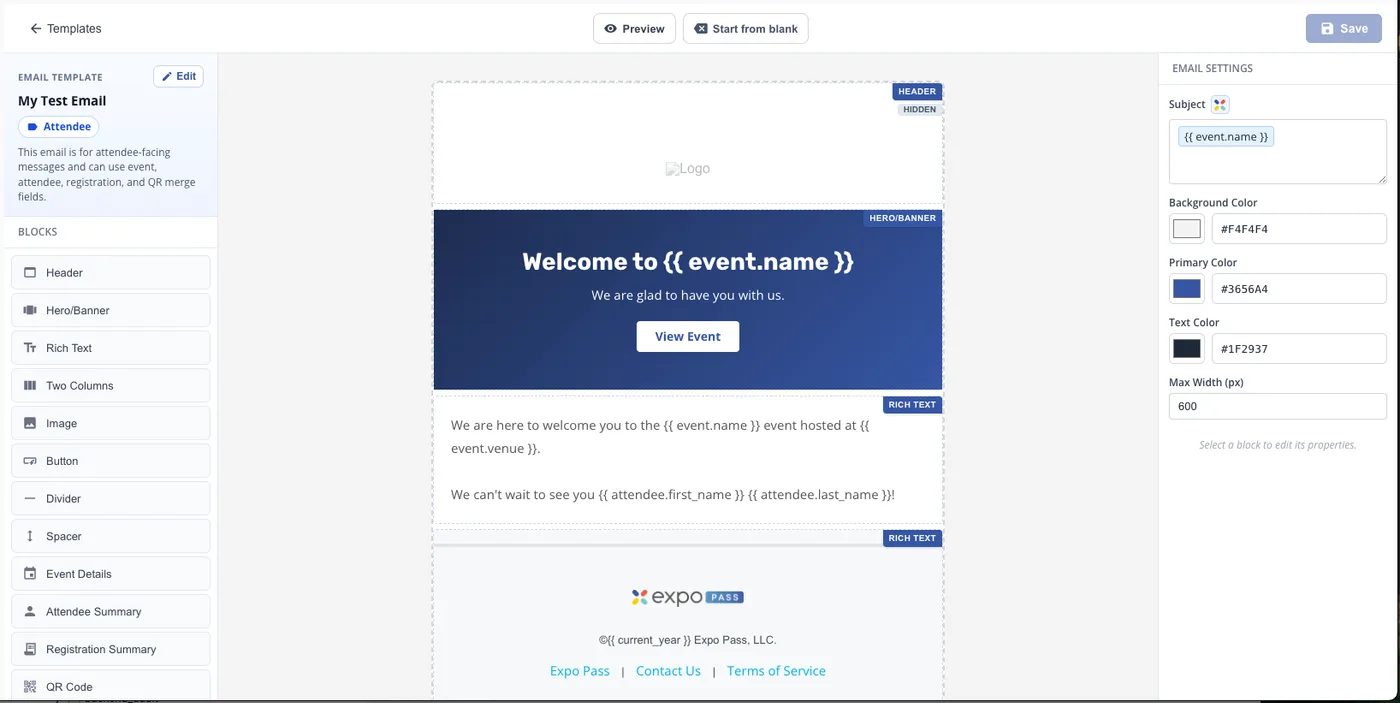
A Drag-and-Drop Email Designer

Beautiful HTML emails, no code required.

  • Build from prefabbed blocks — headers, hero banners, rich text, images, buttons, event details, QR codes — or create custom blocks
  • Mail-merge fields personalize every email with attendee, event, and registration details
  • Per-block conditional visibility and switch-state logic tailor content to each recipient
  • Set brand colors, subject lines, and layout width to match your event
  • Preview as a PDF or send a test email before anything goes out
A Drag-and-Drop Email Designer
Audience Targeting & Scheduled Sends

The right message, to the right people, right on time.

  • Target attendees, exhibitors, speakers, or event users with each send
  • Schedule send jobs with the date, time, and audience you choose
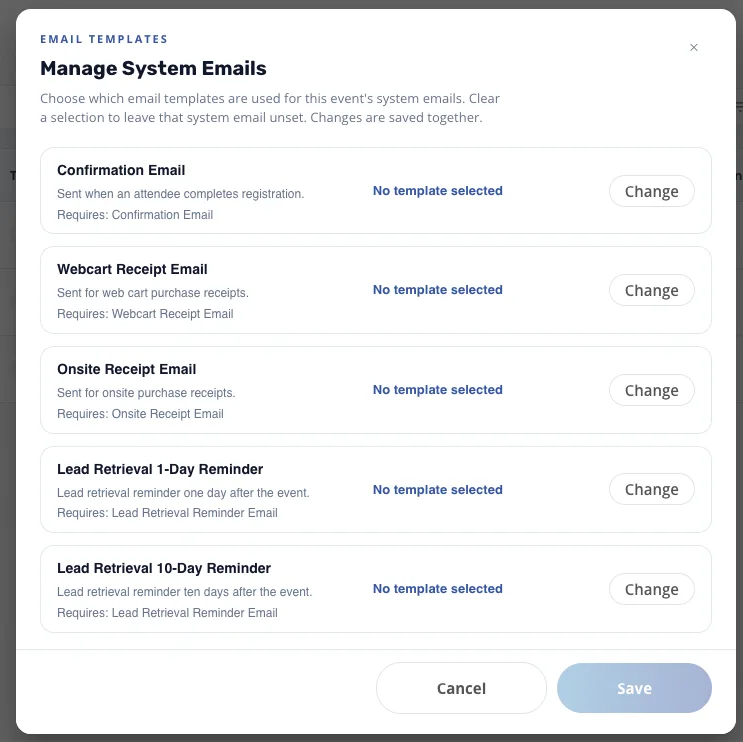
  • Custom template categories at launch — system emails like confirmations and receipts are coming
  • Built-in bounce checking keeps your recipient lists healthy
  • Job history and status show what's queued, sending, and delivered
Audience Targeting & Scheduled Sends
Every Send, Tracked

Know exactly what went out, and to whom.

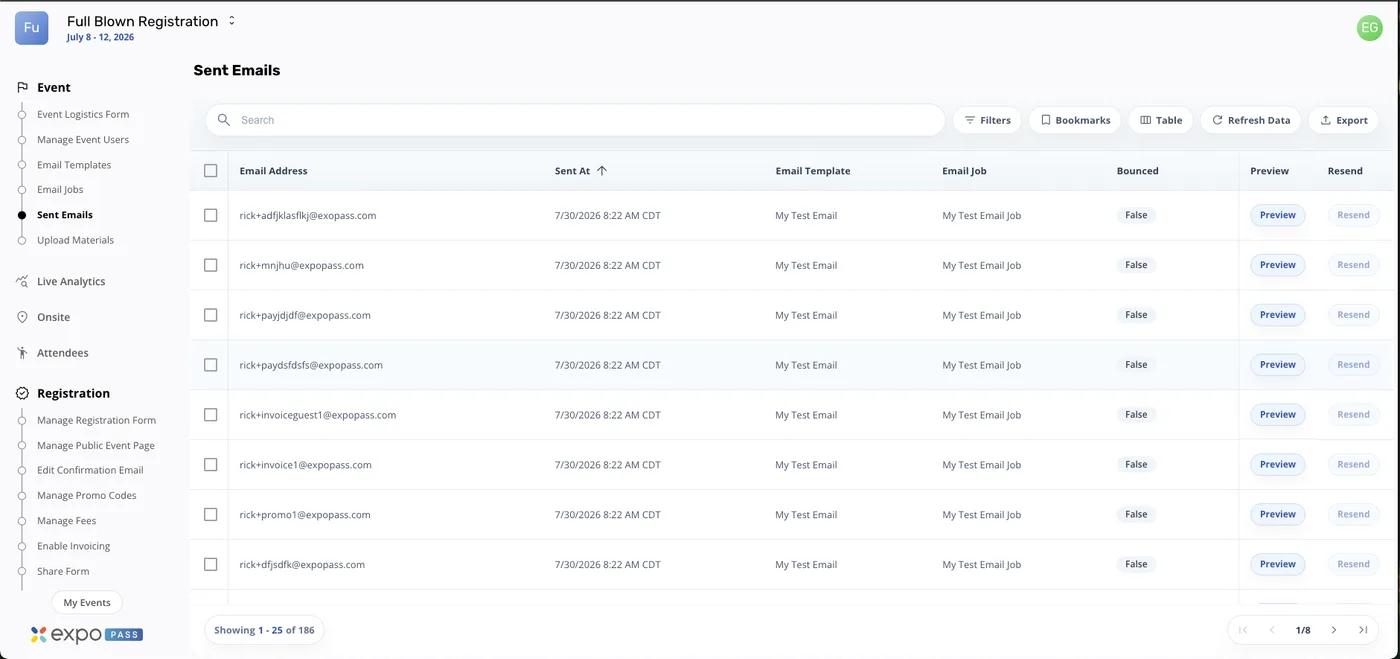
  • Per-email tracking — recipient, template, job, send time, and bounce status
  • View a sample rendering of exactly what each recipient received
  • Resend to individual recipients in one click
  • Search, filter, and export your sent email history
Every Send, Tracked

What Expo Pass customers have to say.

“Expo Pass has been a game-changer for our events! The streamlined check-in process has been a breath of fresh air, and our attendees have raved about how quick and easy it is.”
– Jamie B., VP Google 5.0 star rating
“Our attendees were impressed by the fact they could print their badges onsite. No need to have hundreds of plastic badges on large tables. We used 3 iPads and 2 printers and it looked really nice and professional.”
– Francois F., Head of Global Events G2 5-star review
“Equipment was so easy to install… Attendees loved the badges and quick registration process. Will definitely be using them for future events!”
– Madison C, Event Manager Google 5.0 star rating

Why Custom Email Tools Matter for Conferences, Trade Shows, and Events

On-Brand Every Time

Drag-and-drop blocks and brand controls keep every email looking like your event.

Personal at Scale

Mail-merge fields drop in each recipient's name, event, and registration details automatically.

Smart Content Logic

Show or hide blocks per recipient with conditional visibility and switch-state logic.

Right Audience, Right Time

Target attendees, exhibitors, speakers, or event users and schedule the exact send time.

Cleaner Lists

Built-in bounce checking keeps your sends healthy and your sender reputation intact.

Proof It Went Out

Job history, per-email tracking, sample rendering, and one-click resend — no guessing.

Resources

Related Content

FAQs

How does the email template designer work?

It's a drag-and-drop HTML designer built for event emails. Assemble your message from prefabbed blocks — headers, hero banners, rich text, images, buttons, event details, QR codes, and more — or build custom blocks of your own. Set your brand colors, drop in mail-merge fields, and your template is ready to reuse across sends.

Can I personalize emails for each recipient?

Yes. Mail-merge fields pull in event, attendee, and registration details — like {{ attendee.first_name }} or {{ event.name }} — so every recipient gets a personal email. You can also set per-block conditional visibility and switch-state logic, so different recipients see different content from the same template.

Who can I send emails to?

Target the audience that matters for each message: attendees, exhibitors, speakers, or event users. Pick the audience when you create a send job, and Expo Pass handles the recipient list from your live event data — no exports or list uploads.

Can I schedule emails in advance?

Yes. Create a send job with your template, audience, and a date and time, and Expo Pass sends it on schedule. Every job shows its status in your job history, so you always know what's queued, sending, or done.

How do I test an email before sending it?

Preview any template as a rendered PDF or send yourself a test email before it goes to your audience. After a send, you can view a sample rendering of exactly what a recipient received — and resend to individual recipients if needed.

Can I use these templates for system emails like confirmations?

Custom email templates are available today, and system email categories — like registration confirmation and receipt emails — are coming, so the templates you design will power those automated messages too. Bounce checking and per-email tracking are built in across your sends.

Ready to Upgrade Your Event Emails?

Design branded templates, target the right audiences, schedule the sends, and track every delivery — all inside the platform that already runs your registration and check-in.

Get started now