In this article, we’ll cover:
- What event management software actually does (and why spreadsheets aren’t cutting it anymore)
- The core features every event management platform needs to deliver
- How to evaluate the best event management software for your team’s workflow
- Real-world use cases across conferences, trade shows, and corporate events
- What to look for in 2026 and beyond as event software evolves
Event Management Software: Why It’s the Backbone of Every Successful Event
You’ve got 47 open browser tabs, three spreadsheets that stopped syncing last Tuesday, and a vendor who just asked you to resend the attendee list for the fourth time. Sound familiar?
That’s what happens when event professionals try to run modern events with disconnected tools. Event management software exists to replace that chaos with a single, connected system that handles registration, on-site logistics, attendee engagement, and post-event reporting under one roof.
Whether you’re producing a 200-person corporate retreat or a 15,000-attendee trade show, the right event management software turns your workflow from reactive to proactive. Instead of chasing information across platforms, you’re making decisions with real-time data, automating the repetitive tasks that eat your afternoons, and actually focusing on what makes your events great.
This guide breaks down everything you need to know: what an event management platform should include, how to compare your options, and how to choose the best event management software for the way your team actually works.
What Is Event Management Software?
At its core, event management software is a platform that centralizes every stage of the event lifecycle into one system. Pre-event planning, registration, marketing, on-site operations, attendee engagement, and post-event analytics all live in the same place, sharing the same data.
Think of it as the operating system for your event. Instead of bolting together a registration tool, a separate email platform, a check-in app, and a spreadsheet for reporting, an event management system connects all of those functions so data flows automatically between them.
Here’s what that means in practice:
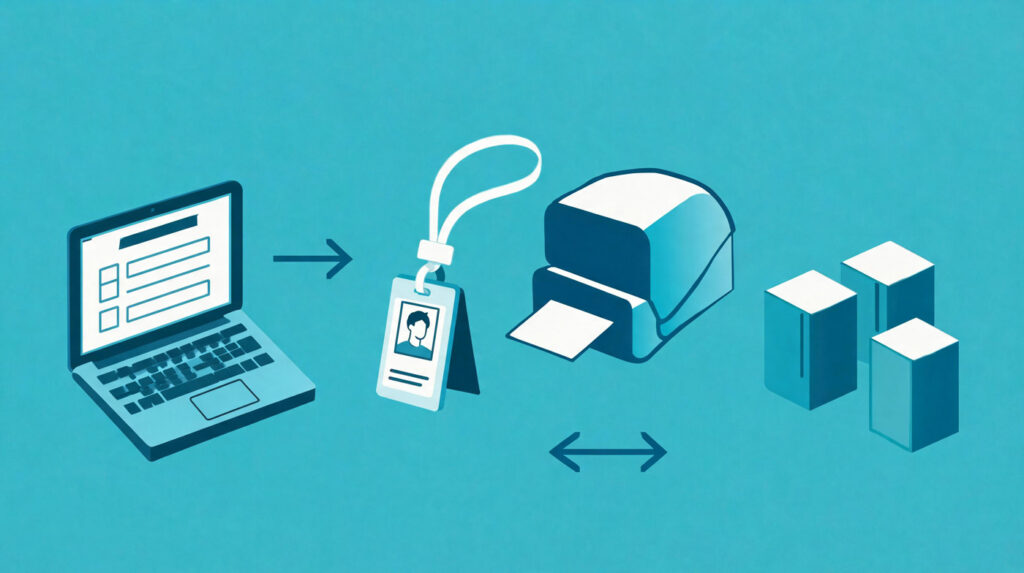
- An attendee registers online, and their information immediately populates your check-in system, your badge printer queue, and your session tracking dashboard.
- A speaker cancels, and your event app updates the agenda in real time while automated emails notify affected attendees.
- Your post-event report pulls registration numbers, session attendance, and survey responses from the same source of truth, no copy-pasting required.
The best event management software doesn’t just digitize your existing process. It removes the manual handoffs and data silos that create errors, waste time, and frustrate your team.
💡 Pro tip: If you’re still evaluating whether you need dedicated event software, ask yourself this: how many hours per event does your team spend moving data between tools? If the answer is more than two, you’ve already found your ROI.
Core Features of Event Management Software
Not all event management platforms are built the same, but there’s a baseline feature set that separates serious event software from glorified signup forms. Here’s what to look for.
Online Registration and Ticketing
Registration is where your attendee relationship starts, and it’s the foundation of every other feature in the platform. Strong event registration software gives you customizable forms, multiple ticket types, promo codes, group registration, and secure payment processing, all without requiring a developer.
Look for platforms that let you build branded registration pages that match your event’s look and feel. The registration experience is your first impression, and a clunky form with generic styling tells attendees you cut corners.
On-Site Check-In and Badge Printing
The registration-to-check-in handoff is where many event management tools fall short. The best platforms connect your online registration data directly to your on-site operations, so when an attendee walks up to the check-in desk, their badge prints in seconds with zero manual lookup.
Modern event check in software supports QR code scanning, self-service kiosks, and on-demand badge printing. That means shorter lines, fewer staffing headaches, and a first on-site experience that sets the right tone.
Mobile Event App
A dedicated mobile event app puts the full event experience in every attendee’s pocket. Interactive agendas, speaker bios, venue maps, networking tools, live polling, and push notifications are table stakes for 2026.
The real value of a mobile event app comes from its connection to the rest of your event management system. Session check-ins feed your attendance reports. Networking connections sync to your CRM. Push notifications drive real-time engagement without requiring your team to manually manage communications.
Attendee Engagement and Networking
Events live or die by the quality of connections attendees make. Your event management platform should include tools for structured networking, like attendee matchmaking, meeting scheduling, and live Q&A. Interactive features such as polls, surveys, and gamification keep energy high throughout multi-day programs.
Exhibitor and Sponsor Management
For trade shows and exhibitions, your event software needs to serve exhibitors and sponsors as well as it serves attendees. Booth assignment tools, lead retrieval integration, sponsor branding placements, and exhibitor portals for managing their own profiles and materials make a huge difference.
Analytics and Reporting
You can’t improve what you don’t measure. A strong event management solution gives you dashboards for registration trends, check-in rates, session popularity, engagement scores, and post-event survey results. Look for platforms that provide real-time data during the event, not just summary reports after it’s over.
The best event management software also supports custom reports and data exports, so you can feed event data into your CRM, marketing automation platform, or executive dashboards without manual reformatting.
Integrations and API Access
No event management system operates in a vacuum. Your platform should connect to your existing tech stack: CRM (Salesforce, HubSpot), marketing automation (Marketo, Mailchimp), payment processors (Stripe, PayPal), and communication tools (Slack, email). Native integrations are ideal, but a well-documented API gives your team flexibility to build custom workflows.
⚡ Practical Advice: Don’t just check whether a platform “has integrations.” Ask how deep those integrations go. A one-way data sync that requires manual mapping is very different from a real-time, bidirectional connection.
How to Choose the Best Event Management Software
With dozens of platforms on the market, finding the right event management software for your team comes down to a few key decisions. Not every platform suits every event type, and overpaying for features you’ll never use is just as costly as underpaying for a solution that can’t scale.
Start with Your Event Type
The event management platform that’s perfect for a recurring monthly webinar series may be completely wrong for a 10,000-person trade show. Different event formats demand different strengths.
- Conferences and multi-track programs need robust agenda management, session-level attendance tracking, speaker management, and a polished mobile app. If conference planning is your bread and butter, prioritize platforms that excel at schedule complexity.
- Trade shows and exhibitions require exhibitor management portals, floor plan tools, lead retrieval, and sponsor inventory management.
- Corporate events and internal meetings prioritize ease of use, branding control, and integration with enterprise communication platforms.
- Virtual and hybrid events need streaming integrations, virtual networking capabilities, and a seamless experience across in-person and remote attendees.
Evaluate the Full Lifecycle
The best event management software covers the full event lifecycle: pre-event planning and promotion, registration and ticketing, on-site operations, real-time engagement, and post-event reporting. Platforms that only handle one phase force you to stitch together separate tools, which means data silos, manual workarounds, and more room for error.
When comparing options, map out your entire event workflow and check each platform against every stage. Where does the platform’s coverage end? What would you need to supplement with third-party tools?
Prioritize Ease of Use
A feature-rich event management system is only valuable if your team can actually use it. Request demos, create test events, and involve the team members who’ll be doing the day-to-day work, not just the decision-maker.
Pay attention to how long it takes to set up a basic event. If the onboarding process requires weeks of training or dedicated customer success hand-holding, that complexity will show up in every event you run.
Consider Scalability
Your event program is going to grow. The event software you choose today should handle that growth without forcing you to migrate platforms in two years. Ask vendors about pricing tiers, attendee limits, and what happens when you need to add new event types or increase volume.
For enterprise teams and organizations running complex event portfolios, corporate event management software with multi-event dashboards, role-based permissions, and centralized reporting is a must.
Compare Pricing Models
Event management platform pricing typically falls into one of three models:
- Per-event pricing works well for teams running a handful of large events per year.
- Per-attendee pricing scales with your event size but can get expensive for high-volume programs.
- Annual subscription pricing gives you unlimited events and attendees for a flat fee, ideal for teams with a full event calendar.
Watch out for hidden costs. Some platforms charge extra for features like badge printing, mobile app access, or API usage that should be included in the base plan.
For a detailed side-by-side breakdown, check out our list of the best event management tools on the market, or read our buyer’s guide on choosing event planning software.
Event Management Software Use Cases: Real-World Applications
Understanding features is one thing. Seeing how event management software fits into actual workflows makes the picture clearer.
Multi-Day Conferences
A national healthcare association runs a four-day annual conference with 6,000 attendees, 200 speakers, and 12 concurrent session tracks. Their event management platform handles registration with tiered pricing (early bird, member, non-member, student), builds a dynamic agenda that attendees personalize through the mobile app, runs on-site check-in across six badge printing stations, and tracks CEU credits automatically through session scans.
Without a connected event management system, that conference would require at least five separate tools and a team member dedicated to data reconciliation.
Trade Shows
A B2B technology company exhibits at eight trade shows per year. Their event software manages booth registrations, lead retrieval hardware provisioning, pre-show marketing emails, and post-show lead scoring. Exhibitors access a self-service portal to upload collateral, manage booth staff credentials, and download their lead lists in real time.
Corporate Internal Events
A Fortune 500 company runs quarterly town halls, an annual sales kickoff, and regional training sessions across 12 offices. Their event management solution standardizes registration and attendance tracking across all event types, provides branded event pages that match corporate guidelines, and feeds attendance data into their HR and L&D systems.
Hybrid Events
A professional development organization hosts monthly workshops with both in-person and virtual attendees. Their event management platform serves the same registration form to both audiences, streams sessions to remote participants through an embedded player, and collects engagement data (polls, Q&A, chat) from both groups into a unified report.
✨ Expert Advice: The strongest signal that you’ve found the right event management solution is when you stop thinking about the software and start thinking about the experience you’re creating for attendees. The technology should disappear into the background.
What Makes a Great Event Management Platform in 2026
The event management software landscape is evolving fast. Platforms that were “good enough” two years ago are falling behind as attendee expectations rise and event programs become more complex. Here’s what’s shaping the best event management software in 2026.
AI-Powered Personalization
Event software is starting to use AI to personalize attendee experiences at scale. That means intelligent agenda recommendations based on registration data, automated attendee matchmaking for networking sessions, and predictive analytics that flag potential no-shows before they happen.
Real-Time Data and Dashboards
Event teams are done waiting until the post-event debrief to learn what worked. The best event management platforms now deliver real-time dashboards that show check-in velocity, session fill rates, engagement scores, and exhibitor booth traffic as the event unfolds. That kind of visibility lets you make mid-event adjustments: moving a popular session to a bigger room, sending a push notification to boost a lagging breakout, or alerting sponsors to high-traffic time windows.
Seamless Hybrid Capabilities
Hybrid events aren’t a trend anymore. They’re a permanent fixture. The best event management system handles in-person and virtual audiences as a single event, not two separate productions stitched together. That means unified registration, synchronized agendas, shared engagement tools, and consolidated reporting regardless of how attendees participate.
Sustainability and Efficiency
Event teams are under increasing pressure to reduce waste, and event software plays a direct role. Digital badges, paperless agendas, on-demand printing (only printing badges for attendees who actually show up), and carbon tracking integrations are becoming standard expectations.
Deeper Integrations
Event management platforms are moving from “we integrate with your CRM” to “we’re embedded in your marketing stack.” Expect tighter connections to revenue attribution models, account-based marketing platforms, and customer data platforms that treat events as a core demand-gen channel, not a standalone activity.
Expo Pass: Event Management Software Built for the Full Lifecycle
Expo Pass is an event management platform designed for professional event teams who need registration, on-site check-in, badge printing, lead retrieval, mobile event apps, and analytics in a single connected system. Instead of cobbling together five tools and hoping the data syncs, Expo Pass connects every stage of your event automatically.
From custom registration forms to on-demand badge printing to real-time attendance dashboards, Expo Pass gives your team the visibility and control to deliver flawless events at any scale.
Final Takeaway
Event management software isn’t a nice-to-have anymore. It’s the infrastructure that determines whether your events run smoothly or fall apart under the weight of disconnected tools and manual processes.
The right event management platform saves your team hours of repetitive work, eliminates data silos, and gives you the real-time visibility you need to make smart decisions before, during, and after every event. Whether you’re running intimate corporate workshops or massive trade shows, investing in the best event management software for your workflow is one of the highest-leverage decisions you’ll make this year.
Start by defining your event types, mapping your workflow, and evaluating platforms against the full lifecycle. The technology should work for you, not the other way around.
Frequently Asked Questions
What is event management software?
Event management software is a platform that centralizes every phase of event planning and execution into one system. It typically covers registration, ticketing, on-site check-in, badge printing, mobile event apps, attendee engagement, exhibitor management, and post-event analytics. The goal is to replace disconnected tools and manual workflows with a single event management solution that keeps your data connected from start to finish.
How much does event management software cost?
Pricing varies widely based on the platform, your event size, and the features you need. Some event management platforms charge per event, others charge per attendee, and some offer annual subscriptions with unlimited usage. Entry-level plans can start around $500 per event, while enterprise-grade event software for large organizations may run $10,000 or more annually. Always ask about hidden fees for features like badge printing, mobile apps, or API access.
What features should I look for in an event management platform?
At minimum, your event management system should include online registration and ticketing, on-site check-in with badge printing, a mobile event app, attendee engagement tools, analytics and reporting, and integrations with your existing tech stack (CRM, marketing automation, payment processing). For trade shows, add exhibitor management and lead retrieval. For virtual or hybrid events, look for streaming integrations and unified attendee experiences.
Can event management software handle hybrid events?
Yes, the best event management software in 2026 treats hybrid events as a single unified experience rather than two separate productions. That means one registration process, one agenda, shared engagement tools (polls, Q&A, chat), and consolidated reporting across both in-person and virtual audiences. Not all platforms handle this well, so test the hybrid workflow before committing.
How do I switch from my current tools to an event management platform?
Start with one upcoming event as a pilot. Migrate your registration data, test the check-in workflow with a small team, and run a parallel process alongside your existing tools if needed. Most event management software providers offer onboarding support, data migration assistance, and training for your team. The key is choosing a platform that can import your existing attendee data and connect to the tools you already use, so the transition doesn’t create more work than it saves.
What’s the difference between event management software and event planning software?
The terms overlap significantly, but event management software typically refers to the full-lifecycle platform that handles both planning and execution, including on-site operations, real-time engagement, and post-event analytics. Event planning software sometimes focuses more narrowly on the pre-event phase: project management, budgeting, vendor coordination, and timeline tracking. Many modern event management platforms include planning features as well, making the distinction less relevant than it used to be.